

Headless CMS platforms promise faster websites, stronger security and the ability to publish content across websites, apps and other digital channels.
For some organisations, those benefits justify the investment. But many marketing teams are being encouraged to adopt headless technology without fully understanding what they will give up.
The biggest question is how much control Marketing will retain once the developers have finished building the site.
On this page:
Coupled CMS versus headless CMS
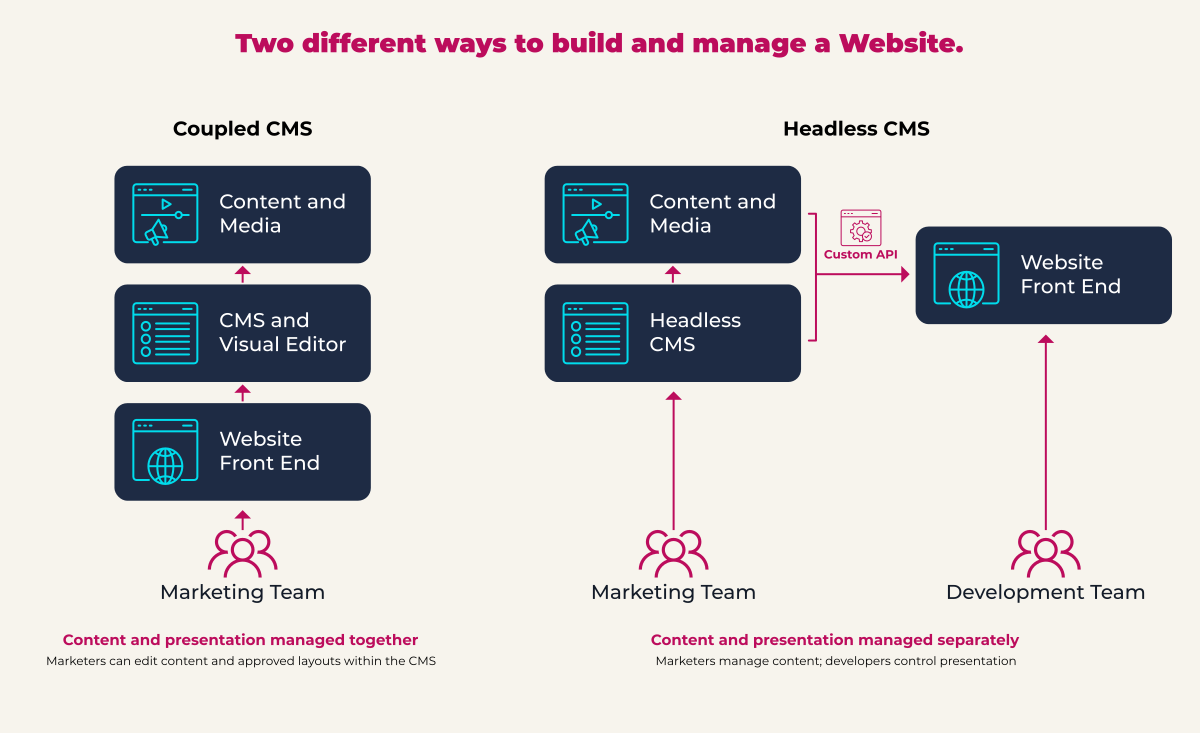
A traditional or “coupled” CMS manages both content and its presentation. The database, editing interface, templates and front end operate as one connected system.
WordPress is the best-known example, although the category also includes platforms such as Drupal, Joomla, Umbraco and many proprietary website CMSes.
A headless CMS separates content from presentation. Content is stored in the CMS and delivered through an API to a custom front end, often built using a framework such as Next.js, Nuxt or Astro.
That creates some real advantages:
- Greater freedom over the front-end experience
- Excellent performance when pages are delivered through a global content network
- A smaller public attack surface
- Structured content that can feed websites, apps, portals and other channels
These benefits matter when an organisation has complex digital requirements, permanent development capability and the need to publish the same content across several channels.
For a conventional B2B marketing website, the calculation is less straightforward.
The initial build will cost more
A headless CMS may appear simpler because it strips the CMS back to content management. In practice, it transfers much of the complexity into a separate front-end application.
That application must be designed, developed, tested, hosted and maintained. The project may require specialist front-end developers, API configuration, a component library, preview functionality and separate deployment infrastructure.
Instead of configuring one website platform, the project team is managing a CMS, an API layer and a custom front end.
As Elementor’s comparison of WordPress and headless CMS platforms points out, headless development involves two codebases, API updates and a full deployment pipeline. Specialist React or Next.js developers are also generally more expensive and harder to source than developers working with established coupled platforms.
AI can help developers produce code faster. It does not remove the need for technical architecture, testing, quality assurance and deployment management.
For most organisations, headless means a substantially larger initial investment than a typical coupled CMS design and build.
The design needs to be settled earlier
Many coupled CMS platforms allow useful movement between design and build.
A page can be created, reviewed in the browser and adjusted visually. A content block can be moved, resized or replaced without rebuilding the underlying application.
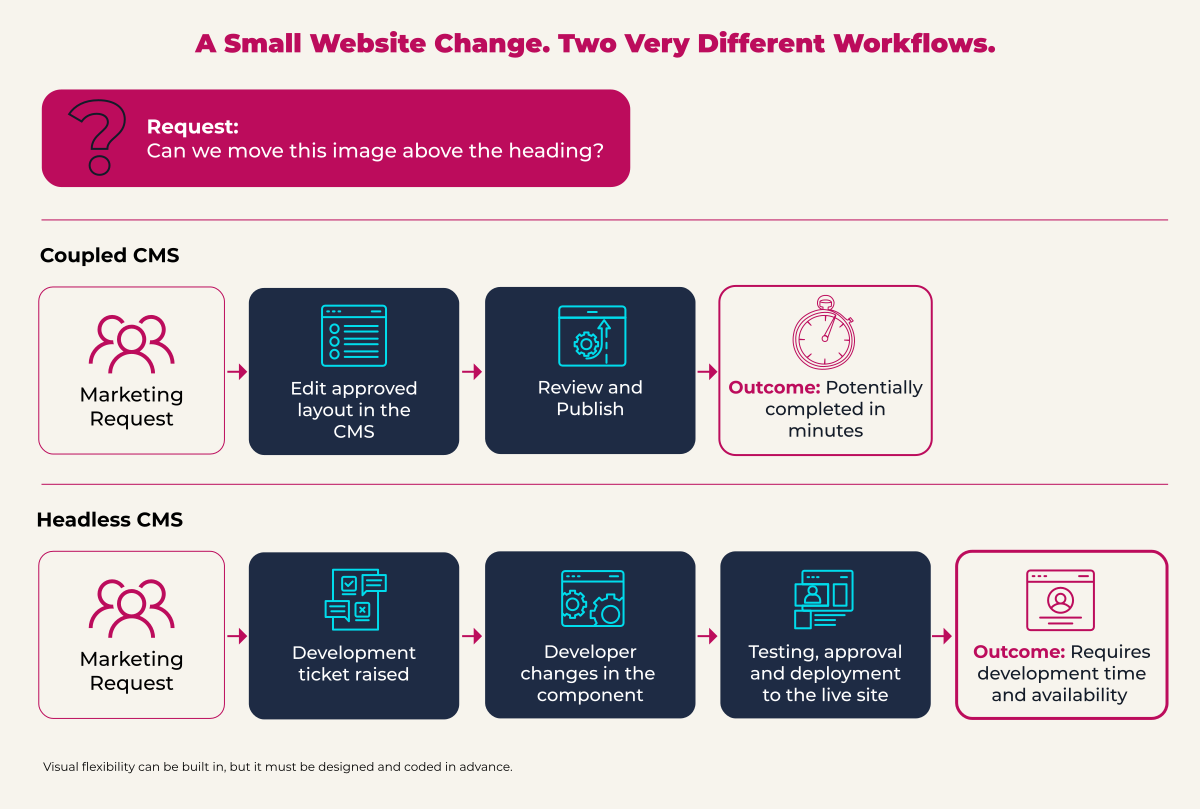
A headless build usually offers less agility. The front end is assembled from coded components. If a layout does not work as expected, changing it may require further design and development.
The team therefore needs to anticipate every important page type, component variation, image position, content combination and mobile behaviour before the build progresses too far.
This is possible with a strong design system, but creating that system adds time and cost. Decisions left unresolved are likely to become additional development work.
Marketing autonomy is the real trade-off
The most important difference appears after launch.
In a well-configured coupled CMS, marketers can usually create pages, rearrange approved components and make modest visual changes without asking a developer.
A conventional headless CMS normally gives editors control over content fields rather than presentation.
Want to move an image above a heading instead of below it? That may require a developer.
Want to change a font size because a longer CTA label no longer fits the button? That may require a developer.
Want a new layout for a campaign landing page or case study? Development work will probably be needed.
This matters because websites need to evolve. Marketing teams create new campaigns, respond to changing audience needs and optimise pages using real-world performance data. As we have explored in our guide to technology and governance for B2B landing pages, different campaigns, audiences and geographic markets can quickly create demand for new page variations.
A flexible visual editor can be built on top of a headless CMS, but the flexibility must be anticipated, designed, coded and tested.
Organisations are therefore left with two practical choices. They can accept that the visual system will remain largely fixed after launch, or maintain an ongoing relationship with the development team.
Both choices can work. Both should be understood and budgeted for before selecting the platform.
AI will not remove the support requirement
AI coding tools make it quicker to generate front-end code. They do not necessarily make the resulting application easier for another developer to understand or change.
AI-assisted development can produce inconsistent patterns, unnecessary dependencies and code that works in the original scenario but becomes difficult to modify. Faster production can create more code for the organisation to own and maintain.
Early research suggests that this continuing human involvement should not be underestimated. A 2026 study of AI-generated code maintenance examined more than 1,000 AI-generated and human-authored files. It found that human developers performed approximately 83% of the subsequent maintenance on AI-generated files.
A developer still needs to review, test and take responsibility for what AI produces. If that developer leaves, the replacement team must understand the application and the decisions embedded within it.
AI should not be used to justify choosing an architecture the organisation cannot support.
Consider who owns the platform
Many newer headless CMS platforms are proprietary software products operated by relatively young, venture-backed companies.
That creates another form of dependency. Once an organisation has built its content models, workflows, integrations and front end around a particular platform, moving away can become difficult and expensive.
The supplier may subsequently:
- Increase licence or usage charges
- Change the features included within each package
- Introduce new limits on users, languages, API calls or bandwidth
- Withdraw functionality
- Change strategic direction
- Be acquired by a larger commercial organisation
An acquisition can bring greater investment and stability. It can also lead to product consolidation, contract changes and higher pricing as the new owner seeks a return.
This risk is not exclusive to headless technology. Proprietary coupled platforms can create exactly the same problem. However, the custom integration between a headless CMS and its front end can make switching particularly disruptive. Replacing the CMS may require content migration, schema remapping, API redevelopment and changes throughout the front-end application.
This is one reason WordPress became so widely adopted. Its open-source model reduces dependence on a single software vendor. Organisations can change hosting companies, agencies or developers while continuing to use the same underlying platform.
Open source does not eliminate maintenance costs or technical risk. It does provide an important form of commercial protection.
Coupled platforms have costs too
Coupled CMS platforms require proper maintenance. Core software, themes, modules and plugins need to be updated and tested. Weak hosting and uncontrolled extensions can create performance and security problems.
Proprietary coupled platforms may also impose their own licensing restrictions and supplier dependencies.
These risks are manageable when platform ownership, hosting, support and governance are considered from the beginning.
A well-governed WordPress implementation can provide controlled design components, locked templates, structured content, multilingual workflows, API access and strong performance. Other established coupled platforms can offer many of the same capabilities.
The important requirement is an architecture that gives the organisation sufficient flexibility without creating unnecessary dependency.
When headless is worth it
Headless becomes compelling when an organisation:
- Publishes the same structured content across several digital products
- Needs a highly bespoke front-end experience
- Has demanding performance or security requirements
- Employs or retains specialist developers
- Is comfortable treating its website as an evolving software product
- Has the budget for continuous front-end development
- Has assessed the platform provider’s commercial stability and exit options
Those conditions apply to some enterprise organisations. They apply to fewer B2B marketing websites than enthusiasm for headless technology might suggest.
Choose an operating model, not a fashionable architecture
A CMS decision determines more than how the next website will be built. It determines who can change it, how quickly Marketing can respond and which technical and commercial dependencies the organisation will carry for years afterwards.
Before committing to headless, marketing leaders should ask:
- Which changes will our team be able to make without a developer?
- What happens when we need a new page layout?
- Who will maintain the front end after launch?
- What happens if the CMS provider increases its prices or is acquired?
- How easily could we move our content to another platform?
- Do our multichannel requirements justify the additional complexity?
Headless offers greater engineering freedom, accompanied by greater dependence on engineers and, frequently, a proprietary platform provider.
For many B2B organisations, a well-built coupled CMS will provide the flexibility, performance and structured content they need while allowing Marketing to retain greater control over the channel it is responsible for growing.
Need help?
If you want a second opinion on where personalisation fits in your next LinkedIn campaign, why not book a free 30-minute consultation with one of our B2B digital marketing experts.